 Searching...
LEDs
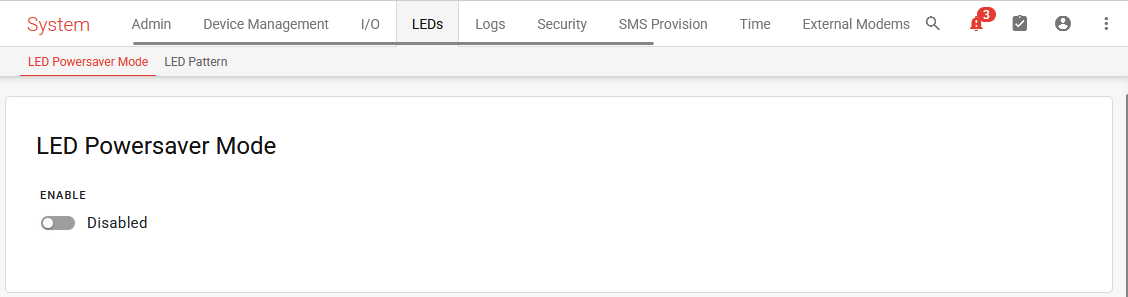
Under System > LEDs, you can configure the router’s LED behavior.
LED Powersaver Mode
LED Powersaver Mode enables you to turn off all the router LEDs, reducing power draw by approximately 90 mW. This may be useful in:
- mobile applications where the router draws power from the vehicle
- power-sensitive environments (such as solar-powered installations) where the router must use significantly less power than in locations where power is readily available.
LED Powersaver Mode is disabled by default.
Please note that turning off the router LEDs reduces your ability to perform basic troubleshooting on the router. Enabling the LEDs again requires access to AirLink OS through a local connection or using ALMS, or resetting the router to factory default settings.
LED Pattern
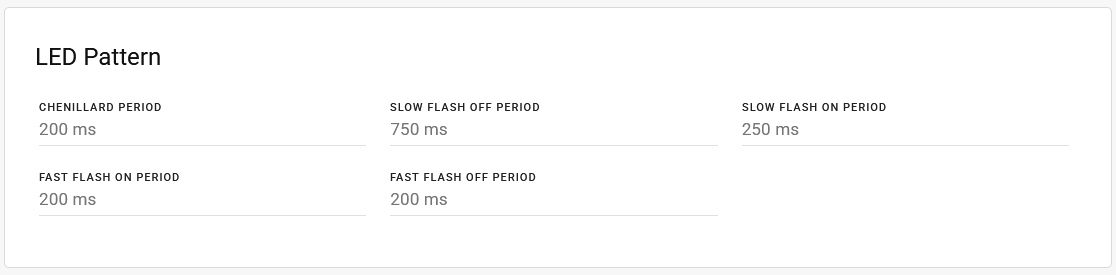
The LED Pattern settings enable you to change the on/off timing of the router LEDs for different states. For the router’s overall LED behavior, see Reading Router LED Colors and Patterns.
| SETTING | DESCRIPTION | RANGE |
|---|---|---|
| CHENILLARD PERIOD | Sets the timing of the LED “chase”, as seen during software and radio module firmware updates. | 0–10000 ms (default 200 ms) |
| SLOW FLASH OFF PERIOD | Sets the LED “off” period for slow flashing states, as seen for Wi-Fi and cellular status. | 0–10000 ms (default 750 ms) |
| SLOW FLASH ON PERIOD | Sets the LED “on” period for slow flashing states, as seen for Wi-Fi and cellular status. | 0–10000 ms (default 250 ms) |
| FAST FLASH ON PERIOD | Sets the LED “on” period for fast flashing states, as seen during reboot and reset. | 0–10000 ms (default 200 ms) |
| FAST FLASH OFF PERIOD | Sets the LED “off” period for fast flashing states, as seen during reboot and reset. | 0–10000 ms (default 200 ms) |