Viewing and Creating Security Certificates
All security certificates used on the gateway can be centrally managed. Certificates are used by several functions on the gateway:
- HTTPS server access
- VPN IPsec tunnels
- WIFI Enterprise connection
Each function will validate the certificate that it is used for.
 Initializing Table Of Contents...
Viewing a Security Certificate
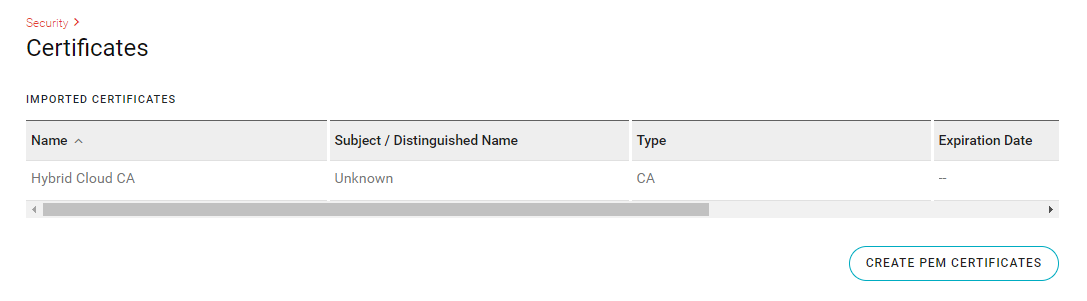
| SETTING | DESCRIPTION | VALUES |
|---|---|---|
| NAME | User defined name identifying the certificate | N/A |
| SUBJECT/DISTINGUISHED NAME | The set of values that were entered during the enrollment and creation of the certificate | N/A |
| TYPE | The type of certificate | User, CA |
| STATUS | Status of the certificate | Untrusted, Valid, Expired, Not yet valid, Wrong private key, Files missing or malformed, Invalid CA |
Creating a Security Certificate
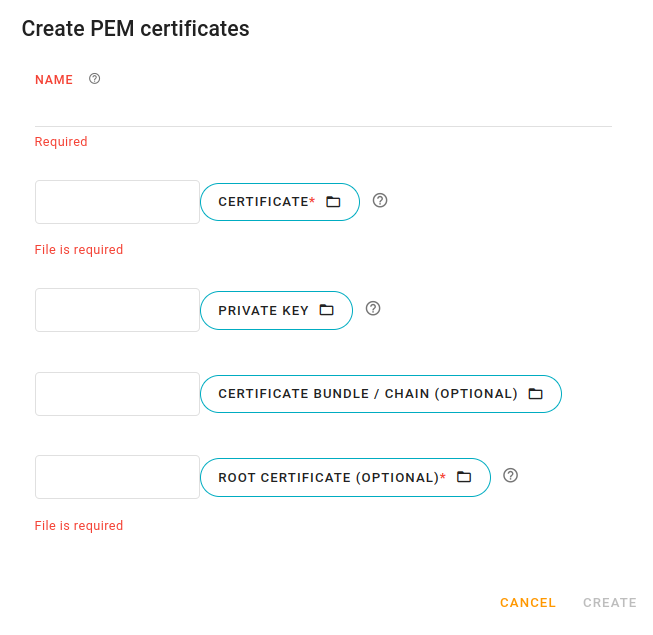
The following settings can be used to create a security certificate.
| SETTING | DESCRIPTION |
|---|---|
| NAME | Required name identifying the certificate |
| CERTIFICATE | Click to upload the certificate file |
| PRIVATE KEY | Click to upload the private key file |
| CERTIFICATE BUNDLE/CHAIN | This is currently not used by any functions on the gateway |
| ROOT CERTIFICATE | Click to upload the root certificate file |
The following table describes which fields are required based on certificate usage.
| OPERATION | CERTIFICATE | PRIVATE KEY | CERTIFICATE BUNDLE/CHAIN | ROOT CERTIFICATE |
|---|---|---|---|---|
| HTTPS | Required | Required | N/A | Ignored |
| VPN IPSEC | Required | Required | N/A | Required |
| WIFI ENTERPRISE | Required | Required | N/A | Optional |